Getting Started
Modified on: 2026-06-05 11:26
TABLE OF CONTENTS
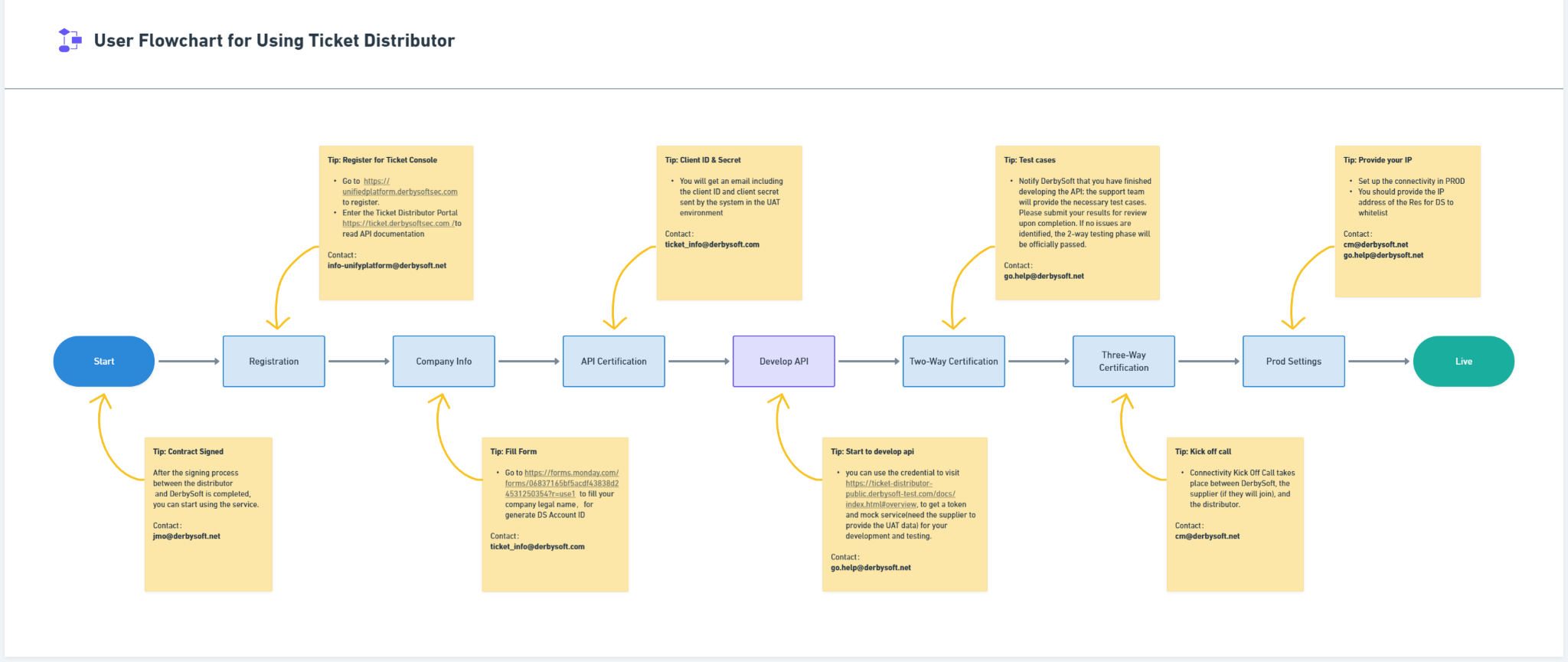
- Register for Ticket Console
- Account Activation
- API Certification
- Two-Way Certification
- Three-Way Certification
- Production Environment Settings
- Your Ticket API is live
Important:To use these APIs the distributor must already have a contract with one of Derbysoft’s ticket supply partners.
Register for Ticket Console
- If you don’t have an account:
Self-register for DerbySoft Unified Platform and Enter Ticket Console, go to https://unifiedplatform.derbysoftsec.com to register. For further details on the operation steps, please refer to this guide. - If you already have an account.
- Method 1: Accessing Console After Registration
Go to this website https://ticket.derbysoftsec.com/ and sign in. - Method 2: Click Enter on the Ticket Card on the Unified Platform
If you belong to several companies, click the icon at the top and select Switch Company to switch your login identity.
- Method 1: Accessing Console After Registration
Account Activation
- Once the Contract is signed, the DerbySoft support team will activate your account and assign you an Account ID.
- This Account ID is a unique identifier used throughout the Ticket Distributor API. Please refer to the Account ID when sending any correspondence.
API Certification
- Credentials are generated for distributors to access our ticket services.
- You will get a token by client ID and client secret sent by the system in the UAT environment.
- At this stage, you can use the credential to visit https://ticket-distributor-public.derbysoft-test.com/docs/index.html#overview, to get a token and mock service for your development and testing.
Two-Way Certification
- DS Support Team Set up the connectivity for supporting the distributor’s development and conducting 2 way testing.
- DS Support Team provides the testing script for the distributor and conducts the 2 way testing with them. Send out the notification of testing results to the related team once the distributor passes the certification.
Three-Way Certification
- Connectivity Kick Off Call takes place between DerbySoft, the supplier (if they will join), and the distributor.
- The DS support team set up the connectivity for the distributor’s development and conducted 3-way testing.
- The DS implementation team will be responsible for conducting 3-way testing with the Distributors. Send out the notification of testing results to the related team once you pass the certification.
Production Environment Settings
- The DS implementation team will set up the connectivity in PROD
- The DS support team requires you to provide the IP address of the Res for DS to whitelist
Your Ticket API is live
- The dedicated support email address will be provided for reporting future issues.
- The 7*24 monitoring team sets up alarms to monitor the connection health automatically.
Did you find it helpful? Yes No
Send feedbackSorry we couldn't be helpful. Help us improve this article with your feedback.